Automated invoice chasing for UK businesses
The Invoice Assistant does your credit control round every weekday morning.
Stop spending your mornings chasing money. Every weekday it reads your customers' replies, chases what's overdue from your own inbox, and brings you only what needs a person.
£1,200 setup, then £297 a month. You approve every message until you're happy.
Sound familiar?
Mornings lost cross-checking Xero and your inbox.
Opening your accounts, scrolling sent emails, and working out who has paid since yesterday before the real work can start.
Customer replies buried in day-to-day email.
Remittances, copy requests, "we've paid" notes and queries sitting between supplier quotes and job emails, so someone gets chased again by mistake.
Awkward calls and reminders put off until evening.
Putting off chasing a regular account or homeowner because it feels uncomfortable, or catching up on overdue invoices late at night.
Completed work that never got billed.
Invoices left sitting as drafts in Xero, or finished jobs in Tradify that were never turned into an invoice.
What it does every weekday morning
- 01
Checks your accounts.
Pulls unpaid invoices, recent payments and each customer's payment record from your accounting software.
- 02
Reads your inbox.
Works out what each customer email means: a remittance, "we've paid", a promise to pay by a date, a request for a copy, an out of office, or a question.
- 03
Catches missed invoices.
Spots invoices stuck as drafts and finished jobs that were never invoiced.
- 04
Chases.
Sends one message per customer, however many invoices they owe, from your own email address, in your name, with your signature: a short note with a pay link for homeowners, weekly statements for big accounts and letting agents, or a formal note asking for a payment date for businesses.
- 05
Reports.
Emails you a morning summary: what it did, what needs you, who is worth a call, and the cash expected this week.
Sends from your own email.
Every message goes from your Gmail or Microsoft 365 address, in your name, with your signature. Customers see a normal email from you, and replies come straight back to your inbox.
Learns how you write.
You describe how your business writes in plain English, and every edit or approval teaches it your wording, with customer details removed.
Second inbox check at 2pm.
Every weekday afternoon it checks your inbox again so afternoon replies, remittances and questions are handled the same day.
Monday report of the week's numbers.
Every Monday morning you get a report of the week's numbers built from your live accounts, alongside your weekday morning summaries.
What you see each morning
Taken from our sample business (Sample Heating & Plumbing Ltd), so you can see exactly what lands in your inbox and how the Assistant screen looks.
SAMPLE DATA: made-up figures to show how this works.

This morning I:
- Chased 37 overdue invoices (£10,396) across 36 customers
- Read and dealt with 7 customer replies
- Matched 3 remittance lines to invoices
- Saved about 286 minutes of admin

6 things need you:
- Claire Delaney is disputing INV-16049
- Paul Hendry has a question about their invoice
- Hollybank Estates: remittance doesn't fully match
- 2 invoices are stuck as drafts in Xero (£1,520)
- 3 finished jobs have no invoice in Xero (about £917)
- Chaser for Emma Ashworth (£3,850) ready to send

Worth a call:
- The Old Forge Restaurant, £1,240: Very overdue (01689 555 0147)
- Mark Marsden, £485: Reminders sent with no payment (07700 929 273)
- Hannah Kingsley, £330: Very overdue (07700 908 396)

Expected in this week: £12,042
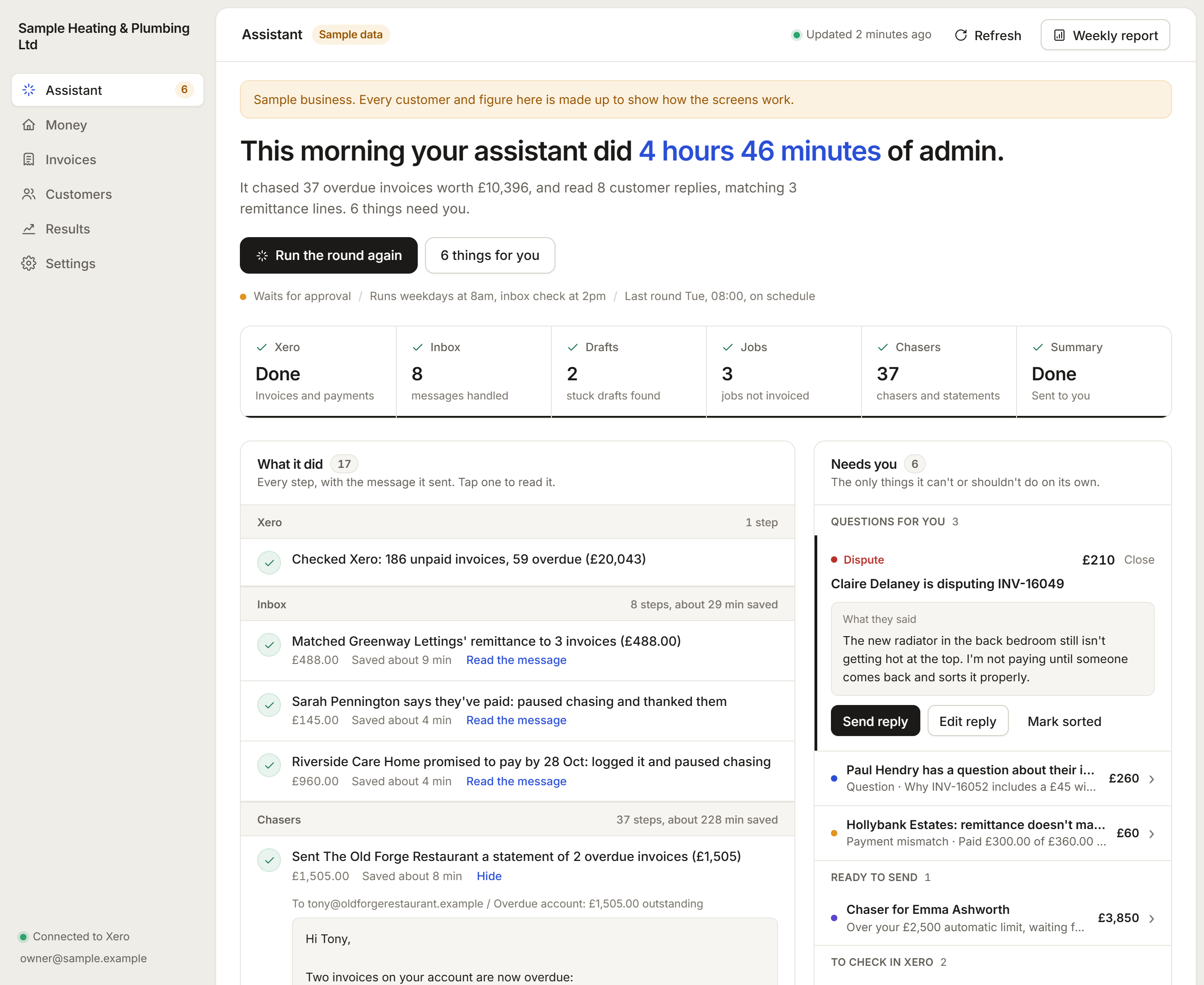
The Assistant screen logs every message it sent or wants to send (tap any step to read the full email), alongside the Needs you queue for disputes, queries, part payments, stuck drafts and uninvoiced jobs.
It reads the replies, so you don't have to
| Customer says | What the assistant does |
|---|---|
| Sends a remittance | Matches it to the invoice and stops chasing. Part payments and mismatches come to you. |
| "We've paid" | Pauses chasing and thanks them. |
| Promises to pay by a date | Logs the date and waits until then. |
| Asks for a copy | Sends them the invoice link, or passes it to you if it can't. |
| Is out of office | Leaves them alone until they are back. |
| Disputes or asks a question | Stops chasing and passes it to you with their words and a reply drafted. |
You stay in control
Approval mode for as long as you like.
It starts by preparing every message for your OK. Keep it that way as long as you like, or switch to automatic within your rules.
Your money limit.
Any customer owing more than your limit is never chased automatically. It waits for you.
Your hours.
It only sends in the hours you set, on weekdays, and spreads a big backlog over several days.
One button to stop.
Pause all sending at any time.
Never sends twice.
Every message is recorded, so nobody gets the same chaser twice.
Checks again before it chases.
Seconds before sending, it checks the invoice is still unpaid. If anything has changed, it leaves it alone.
Disputes always go to a person.
It stops chasing, and you get their email with a reply drafted.
Read-only on your accounts.
It reads your accounting software and never changes anything in it.
Everything in one place
Every message it sent or wants to send can be opened and read in full.
- Money
- what is overdue, cash expected over the next two weeks, payments this week, average days to get paid, aged debts and a call list.
- Invoices
- what needs attention, what is ready to send, what needs a call.
- Customers
- each customer's payment record, from pays on time to slow payer.
- Results
- cash paid on chased invoices and how your days to get paid change month by month.
- Late payment charges
- the statutory interest and fixed charges you could claim from business customers under the Late Payment of Commercial Debts (Interest) Act 1998.
Works with the tools you already use
Accounting software: Xero connects in minutes. QuickBooks, Sage and FreeAgent are connected as part of setup.
Email: Gmail (Google Workspace) or Outlook (Microsoft 365).
Job management: Tradify jobs can be imported to catch finished work that was never invoiced.
Connecting it to your systems is part of the setup.
Price
Invoice Assistant
You approve everything at the start
- £1,200 setup, which covers connecting it to your accounting software and inbox and setting your rules.
- £297 a month after that, 3-month minimum, then rolling monthly.
- Starts by preparing every message for your OK. Keep it in approval mode as long as you like, or switch to automatic within your rules.
For UK businesses. No VAT is added: Aucta AI is not VAT registered.
Who it's for
Trade, service and professional businesses that invoice customers and spend time every week chasing payment: builders, electricians, plumbers and heating engineers, garages, cleaning, facilities and property maintenance firms, agencies and consultancies. If you already have a credit controller, it does the routine chasing so they can focus on the difficult accounts.
How it starts
- Step 1
Free 30-minute call to see whether it fits how you invoice.
- Step 2
Setup: we connect your accounting software and inbox and set your rules with you.
- Step 3
Approval mode: it prepares every message for your OK, so you see and edit what it would send.
- Step 4
Your pace: stay on approval as long as you like, or switch to automatic within your rules.
Common questions
Will it send anything without me knowing?
No. It starts in approval mode, preparing every message for your OK. You can keep it in approval mode as long as you like, or switch to automatic within your rules, where any customer over your money limit always waits for you.
Does it email from my address?
Yes. Messages go from your connected Gmail or Microsoft 365 address, in your name, with your signature. Customers see a normal email from you, and replies come straight back to your inbox.
Will it sound like a robot?
No. You describe how your business writes in plain English, and every edit or approval teaches it your wording, with customer details removed. Before any message goes out, a check confirms the amounts, invoice numbers and links match your accounts.
What if a customer gets upset or disputes an invoice?
It stops chasing that customer at once and passes their email to you with their exact words and a reply drafted, so you decide what happens next.
Does it change anything in my accounts?
No. It reads your accounting software and never changes anything in it.
Which accounting software does it work with?
Xero connects in minutes. QuickBooks, Sage and FreeAgent are connected as part of setup, alongside Gmail or Outlook for email.
How long does setup take?
For businesses on Xero with Gmail or Microsoft 365, connecting your accounts and inbox takes minutes on a short onboarding call, and we set your rules with you. Connections for QuickBooks, Sage or FreeAgent are built as part of setup.
Can I stop it or cancel?
Yes. There is a single pause button to stop all sending at any time. The subscription has a 3-month minimum term and then runs rolling monthly.
Where is my data held?
Your business data is stored in our London (UK) database region. Xero and mailbox tokens are encrypted at rest, each business's data is kept strictly separate, and disconnecting revokes access at once.
How much does it cost?
£1,200 setup, then £297 a month on a 3-month minimum, then rolling monthly.
Related systems
Spend less time chasing money.
Book a free 30-minute call and see whether the Invoice Assistant fits how you invoice.